FileChute

FileChute
License:
Trial version
Language:
English
Developer:
Developer's website
OS:
Mac OS X
Updated:
See detailed info

Softonic review

Cyril Roger

“Send oversized files easily”

by Cyril Roger about FileChute

Attachment sizes on emails regularly increase, and you can often find ways to share files online. Yet sending large files to someone can be a bit of a trick.

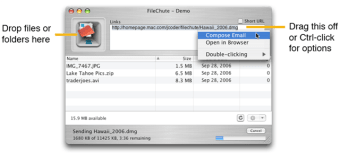
If you have an online storage account, such as .Mac, then sending large files with FileChute is really easy. Just drag and drop your files and let File Chute do its job. You can automatically create and store all of them into an archive file and scramble the file name to protect them. FileChute also lets you encrypt your file, although it will have to be a disk image.

Once you've entered login details for your storage account and have store the files on it, all you need to do is send a link to them to your friends. The program includes an automatic link shortener so you don't have to send a really long link to your files to your friends.

All FileChute really lacks is a truly nice interface to enjoy it on Mac OS X Leopard.

Despite the old interface, FileChute is a great program to send large files online easily.

Pros
  • Auto link shortener
  • Drag and drop
Cons
  • Old interface
Download FileChute 4.3.5

FileChute is virus free

We have analyzed the latest version of FileChute with 30 antivirus engines and it is virus free. See analysis results.

TESTED VIRUS FREE - Softonic GUARANTEED

Developer's description

FileChute works by using your .Mac account as temporary storage. If you already have a .Mac account, FileChute virtually configures itself. If you don't have one, opening a free trial account is easy and FileChute can bring you to the sign up page. FileChute can also be configured to work with other WebDAV or FTP-accessible web servers.

FileChute doesn't stop there, it provides a host of features to make your life even easier:

  • On-the-fly archive creation (zip/dmg/tar) makes sending folders (or multiple files) as easy as sending a single file.
  • Automatic obfuscating of filenames to keep your files more secure.
  • On-the-fly encryption (dmg only) for even better security.
  • Auto delete files on server after a configurable number of days.
  • Generate short URLs using SnipURL

Review and rate FileChute

Your avatar

Your opinion is important.
Help other users - be the first to review this program.

Review
  1. Maximum: 75 characters

  2. See example

Pros and Cons
Rate
  1. What rating would you give FileChute?

    You need to fill in all fields

    • Usability:

      Not rated
    • Stability:

      Not rated
    • Installation:

      Not rated
    • Functionality:

      Not rated
    • Appearance:

      Not rated
    • Overall rating:

      Not rated
  2. Don't worry, we won't make your email address public.

You're not allowed to share serial numbers, cracks, etc. or link to pages that contain them. If you do, your user account will be deleted, your IP address logged and legal action will be taken.

Get started - just ask a question!

Write a title for your question.

Alternativesto FileChute

  • In English:
    FileZilla
    FileZilla

    Secure and fast FTP transfers

    Softonic rating:
    • 7/10
    User rating:
    • 7/10
  • Free:
    Fugu
    Fugu

    Open source SFTP

    Softonic rating:
    • 8/10
    User rating:
    • 6/10
Compare with FileChute
Download rank: Ftp

29 of 29

Softonic rating:
  • Very good
  • 8/10
Your rating:
Your rating
  • 0

Review and rate this program

Top Downloads: Ftp

  • United States
  • Global

  1. Elegant and efficient FTP client

Reviews of FileChute in other languages